Batch jobs
This example demonstrates how a batch of jobs can be created, submitted and managed within Lightworks.
[1]:
import lightworks as lw
from lightworks import remote

try:
    remote.token.load("main_token")
except remote.TokenError:
    print(
        "Token could not be automatically loaded, this will need to be "
        "manually configured."
    )
Once imported, batches are created using the Lightworks Batch object. Below, a list of 4 random unitary circuits are created which will be sampled from. We then use the same input state and number of samples, but change the value of min_detection between the circuits.
Note
When the same value is to be used for all tasks in a batch then this only needs to be specified once, but still needs to be within a List.
[2]:
circuits = [lw.Unitary(lw.random_unitary(4)) for _ in range(4)]

batch = lw.Batch(
    lw.Sampler,
    task_args=[circuits, [lw.State([1, 0, 1, 0])], [100]],
    task_kwargs={"min_detection": [2, 1, 2, 2]},
)
This batch of tasks is then run on the QPU backend in the same way as normal. This will return a BatchJob which can be used for management in a similar way to the standard job.
[3]:
qpu = remote.QPU("Artemis")

jobs = qpu.run(batch, job_name="Batch job")
First, we can view the names of each job. This will be the base name specified to job_name with _X appended to it, where X is an integer.
[4]:
jobs.names
[4]:
['Batch job_1', 'Batch job_2', 'Batch job_3', 'Batch job_4']
Other quantities of the jobs can then be accessed with the corresponding attribute, such as job ID, status and queue position.
[5]:
jobs.job_id
[5]:
{'Batch job_1': '17763',
 'Batch job_2': '17764',
 'Batch job_3': '17765',
 'Batch job_4': '17766'}
[6]:
jobs.status
[6]:
{'Batch job_1': <Status.RUNNING: 'Running'>,
 'Batch job_2': <Status.SCHEDULED: 'Scheduled'>,
 'Batch job_3': <Status.SCHEDULED: 'Scheduled'>,
 'Batch job_4': <Status.SCHEDULED: 'Scheduled'>}
[7]:
jobs.queue_position
[7]:
{'Batch job_1': None, 'Batch job_2': 2, 'Batch job_3': 3, 'Batch job_4': 4}
There is then also attributes for checking whether all jobs are complete & successful.
[8]:
print("Complete: ", jobs.all_complete)
print("Successful:", jobs.all_success)
Complete:  False
Successful: False
And jobs can be cancelled if this is required.
[9]:
if False:
    jobs.cancel_all()
The batch job also behaves similar to a dictionary, meaning standard operations such as iteration can be used to access the individual jobs if this is required.
[10]:
for name, job in jobs.items():
    print(name, job.status)
Batch job_1 Running
Batch job_2 Scheduled
Batch job_3 Scheduled
Batch job_4 Scheduled
Results
Once jobs are complete, the results can then be downloaded. This can be completed in a single command using get_all_results(). If for some reason no results have been generated, this will create a warning message rather than raising an exception.
[11]:
jobs.wait_until_complete()
all_results = jobs.get_all_results()
Alternatively, the job name can be used to retrieve individual results if this is required.
[12]:
result = jobs.get_result(jobs.names[0])
[13]:
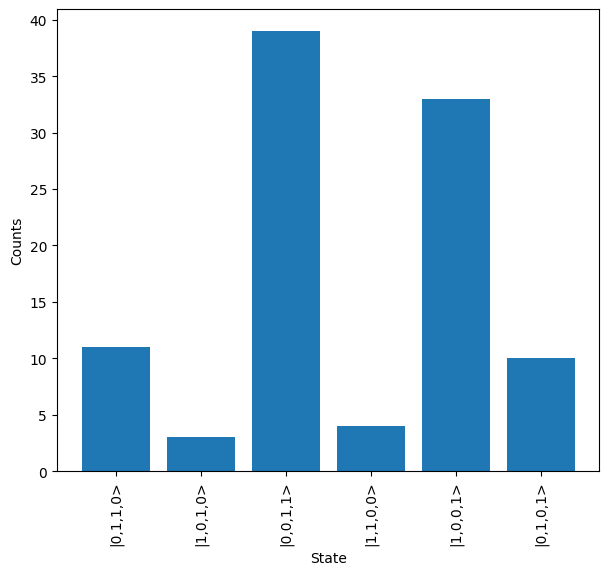
result.plot()